 Help Center
This guide walks you through the most common requests for reducing specific notifications on the Gen 2 alarm system. While certain security features cannot be fully disabled, there are effective workarounds to minimize alerts when the system is disarmed, turn off motion-sensor LED lights, and assist users who may have difficulty hearing arming and disarming tones.
Follow the steps below to customize your system for a quieter and more accessible experience—without compromising security.
1. Sensors cannot be fully disabled when disarmed, however there is a solution:
- The door sensors open/close app notifications can be disabled when the system is in the disarmed state.
1. Select the App Setting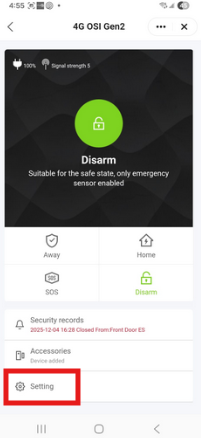
2. Then disable the 'Entry Notification'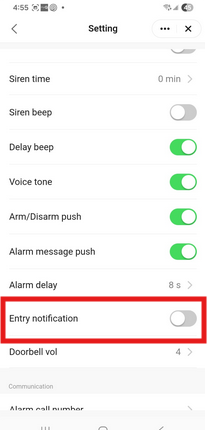
- The security records on the panel will indicate when a door has been opened/closed, however it will not show on the app security records.
When the panel is armed it will still trigger an alarm and the triggered sensor alarm will show up in the security records.
2. If you do not want the receive Arm and Disarm notifications, you can disable this as well.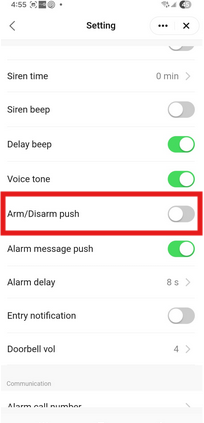
3. Motion sensor LEDs can be disabled;
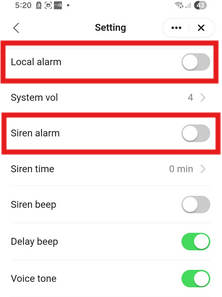
(We strongly suggest temporarily disabling the 'Local alarm' and the 'Siren alarm' in the Alarm device 'Settings' the reason for this is when you take the back cover off it will trigger the tamper alarm.)
Take the Back Cover off of the motion sensor, you will see 2 Dip Switches.
Set Dip switch 1 to Off: LED light off.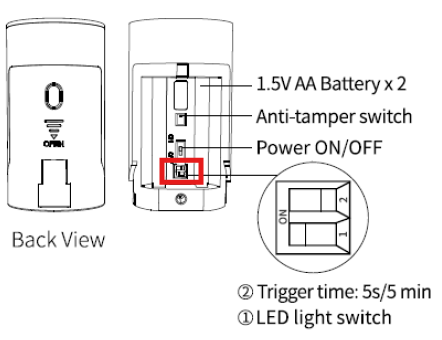
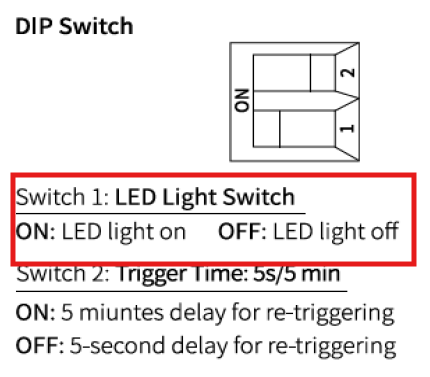
- The PIR Motion sensor will still be active and will trigger when the system is armed.
4. Remote control arming/disarming beeps are not supported as a separate feature:
- The alarm panel does audibly count down when it is armed and does omit a sound when disarmed.
- If someone has challenges hearing, this may be a solution that may work for them. Click the link below for more information:
How to create a Smart Life scene to Turn a Light On When Arming and Off When Disarming the Alarm
Remember to re-enable the Local Alarm and Siren Alarm settings.
We hope this helps.
OSI Go Direct - Customer Support