 Help Center
What is the detection range for the PIR Motion Sensor (Gen 2)?
Detection Range 16 feet (5m). This is the distance that a person can be away from the motion detector before they are detected by the infrared sensor.
How do you replace the batteries in the Motion Sensor?
To replace the 2 x AA Batteries follow these steps (should last up to 1 year):
- Remove the Motion Sensor from the base that is affixed onto the wall by sliding it upwards.
- Once removed press and slide the back cover in a downwards position until the back cover is fully removed
- Remove the old AAA Batteries
- Insert the new AAA Batteries
- Slide the back cover back on by pressing the back cover and sliding it upwards
- Align the back of the motion sensor to the mount on the wall and sliding it upwards and adjust the position back to the proper angle.
How do you replace the battery in the Contact Sensor?
To replace the two 2450 3V Lithium Coin batteries follow these steps (should last between 3-5 years):
- Press and slide the larger side cover towards the direction of curved side of the contact sensor until it comes right off.
- Take out the old 2450 3V Coin batteries and insert the new 2450 3V Coin Batteries.
- Place the cover over the bottom piece which is affixed to the door and slide it towards the direction of the flat side of the contact sensor.
How do you replace the battery in the Remote Controller?
To replace the the one CR2032 Lithium Coin battery follow these steps (should last up to 1 year daily usage):
- Take the included Purple Pick which comes with the OSI Smart Alarm System (Gen 2) (in the same little plastic bag which the 8 zone wireharness, USB-C Cable, pack of screws and wall anchors came in) and pry inbetween the two halves of the remote until they come apart. You can also use a flat head screw driver (please do this gently).
- Take out the old CR2032 Lithium Coin battery and insert the new CR2032 Lithium Coin battery.
- Snap the two halves back in place
How long do OSI Alarm Sensor batteries last and is there an indication when they are low?
When the batteries are low on both the motion sensors and the contact sensors, the OSI Alarm Display will show a low battery warning on the display. You will also get a notification on your phone as well. Click here for more details. Below is the approximate time that the batteries will last in the sensors with normal usage.
Depending on the amount of triggers for each sensors or accessory:
(Approximately)
- Contact Sensors: 2 years
- Motion Sensors: 1 year
- Remote Controllers: 1 year if used daily
- Wireless Siren internal rechargeable battery: 2-3 years
What is the maximum distance alarm accessories can be from the OSI Alarm Display (Gen 2)?
In typical residential environments, wireless range is approximately:
-
Door / Window Sensor (Gen 2):
15 m (50 ft) -
PIR Motion Sensor (Gen 2):
15 m (50 ft)
Walls and large furniture will influence range. -
Remote Control (Gen 2):
15 m (50 ft) -
Wireless Strobe Siren (Gen 2):
15 m (50 ft)
Walls and large furniture will influence range.
Important Notes on Signal Range
-
Walls and other barriers will reduce signal strength.
-
Concrete walls or metal cladding can significantly reduce wireless distance.
-
If sensors or magnets are mounted on metal doors, windows, or frames, this can interfere with the magnetic field.
-
In cold weather, metal patio doors or window frames can weaken transmission by reducing battery performance.
-
An RF signal repeater can help resolve sensor connection issues.
👉 Follow this link for solutions to sensor connection issues.
What radio frequency do these accessories use?
-
Encoder: EV1527
-
Radio Frequency: 433 MHz
The OSI Alarm System (Gen 2) also supports other brands of 433 MHz EV1527 accessories.
For third-party entry sensors, add them from:
Accessories → “+” → General on the display.
👉 See this article for more information
How many accessories can be added to the OSI Alarm System (Gen 2)?
-
Remote Controllers: Up to 6
-
Keypads: Up to 6
-
Wireless Strobe Sirens: Up to 10
-
Vibration Sensors, Motion Sensors, and Contact Sensors:
160 total combined
(You may add any mix, as long as the total does not exceed 160.)
What type of batteries do the accessories use?
-
Door / Window Contact Sensor (Gen 2):
2 × CR2450 3V lithium coin batteries -
PIR Motion Sensor (Gen 2):
2 × AA batteries -
Remote Control (Gen 2):
1 × CR2032 lithium coin battery -
Wireless Strobe Siren (Gen 2):
Built-in 3.7V 500mAh rechargeable lithium battery
(Battery is built-in and does not require replacement.)
What is the detection range of the PIR Motion Sensor (Gen 2)?
-
Detection Range: 16 ft (5 m)
This is the maximum distance at which a person can be detected by the infrared sensor.
How do you replace the batteries in the PIR Motion Sensor?
Battery life is approximately up to 1 year.
-
Slide the motion sensor upward to remove it from the wall-mounted base.
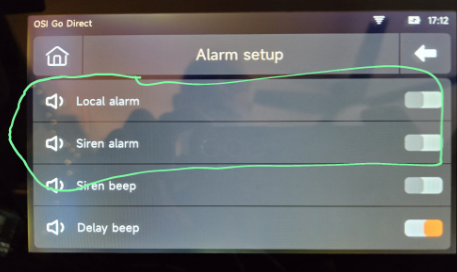
Tip: The tamper alarm will be triggered, temporarily disable the Local Alarm and the Siren alarm. -
Press and slide the back cover downward until it is fully removed.
-
Remove the old AA batteries.
-
Insert new AA batteries, observing correct polarity.
-
Slide the back cover upward to reattach it.
-
Align the sensor with the wall mount and slide it upward.
-
Adjust the angle as needed.
How do you replace the batteries in the Contact Sensor?
Battery life is approximately 3–5 years.
-
Press and slide the larger cover toward the curved side of the sensor until it comes off.
Tip: The tamper alarm will be triggered, temporarily disable the Local Alarm and the Siren alarm. -
Remove the old CR2450 3V lithium coin batteries.
-
Insert the new batteries.
-
Place the cover back on and slide it toward the flat side until secure.
Tip: To avoid the panel from audibly alarming, you can temporarily turn off the Local and Siren alarm as shown below.
 or
or 
How do you replace the battery in the Remote Controller?
Battery life is approximately up to 1 year with daily use.
-
Use the included purple pick (found in the accessory bag with the wiring harness, USB-C cable, screws, and anchors) to gently pry between the two halves of the remote.
A flat-head screwdriver may also be used carefully. -
Remove the old CR2032 lithium coin battery.
-
Insert the new battery.
-
Snap the two halves back together.
How long do OSI Alarm accessory batteries last, and is there a low-battery warning?
Yes. When a battery is low:
-
A low battery warning appears on the OSI Alarm Display for Motion and Entry Sensors.
-
You will also receive a notification on your phone.
- 👉 See this article for additional battery saving tip for motion sensors
Approximate battery life with normal usage:
-
Contact Sensors: ~2 years
-
Motion Sensors: ~1 year
-
Remote Controllers: ~1 year (daily use)
-
Wireless Strobe Siren (internal rechargeable battery): ~2–3 years
Note: Depending on how much traffic there is or how often a door is opened or closed will have an affect on the life of the battery.
Wireless Strobe Siren (Gen 2) – Specifications

-
Power Supply: AC 100–240V
-
Built-in Battery: 3.7V / 500mAh
-
Standby Current: < 10mA
-
Alarm Current: < 200mA
-
Wireless Frequency: 433 MHz
-
Receiving Distance: ≤120 m (open area)
-
Product Size: 90 × 90 × 45 mm