 Help Center
Overview
Entry sensors include a built-in tamper switch designed to trigger an alert if the sensor cover is removed or not fully seated. This is a normal security feature.
On rare occasions, the tamper switch may become slightly offset, which can cause:
-
A tamper alert even when the cover appears closed
-
The sensor to show as open or tampered in the app
-
Intermittent tamper notifications after battery replacement

What Causes This
Inside the sensor is:
-
A small plastic tamper switch (spring contact)
-
A plastic tamper leg on the back cover that presses against the switch
If the cover is removed or reinstalled at a slight angle, the metal contact may not realign perfectly with the plastic leg.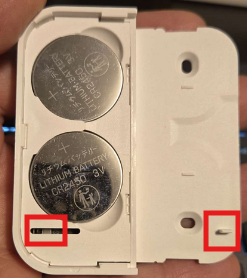

Here is a closer photo of the tamper switch located inside the sensor. It is the small black piece highlighted in the photo.
When the cover is closed by sliding it to the right, the tamper leg on the cover presses down on the spring-loaded tamper switch.
When the cover is opened by sliding it to the left, the tamper leg releases the spring-loaded tamper switch. This will trigger the alarm.
You can confirm that the tamper switch was triggered by checking the Alarm Log. It will display:
Tamper Alarm – Entry (Sensor Name)
How to Fix the Issue (Recommended Steps)
- First temporarily disable the Local Alarm and Siren Alarm

-
Remove the back cover completely
-
Inspect the tamper switch area
-
Look for the small metal contact inside the sensor (as shown in the image).
-
-
Reseat the cover multiple times
-
Slide the back cover on and off 2–3 times.
-
This action usually realigns the plastic tamper leg with the metal switch.
-
-
Test the sensor
-
Open and close the door/window once.
-
Confirm the tamper alert clears in the app.
-
- Remember to re-enable the Local Alarm and the Siren Alarm

If the plastic tamper leg on the back cover that presses against the switch is broken then you will require a new 'Entry Sensor' or you may try to contact our sales department to check if they may have an extra cover available.