 Help Center
Overview
Entry sensors include a built-in tamper switch designed to trigger an alert if the sensor cover is removed or not fully seated. This is a normal security feature.
On rare occasions, the tamper switch may become slightly offset, which can cause:
-
A tamper alert even when the cover appears closed
-
The sensor to show as open or tampered in the app
-
Intermittent tamper notifications after battery replacement

What Causes This
Inside the sensor is:
-
A small metal tamper switch (spring contact)
-
A plastic tamper leg on the back cover that presses against the switch
If the cover is removed or reinstalled at a slight angle, the metal contact may not realign perfectly with the plastic leg.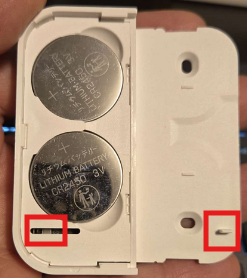
How to Fix the Issue (Recommended Steps)
-
Remove the back cover completely
-
Inspect the tamper switch area
-
Look for the small metal contact inside the sensor (as shown in the image).
-
-
Reseat the cover multiple times
-
Slide the back cover on and off 2–3 times.
-
This action usually realigns the plastic tamper leg with the metal switch.
-
-
Test the sensor
-
Open and close the door/window once.
-
Confirm the tamper alert clears in the app.
-