 Help Center
Please check the attached video and follow the steps below.
1. On the main screen, select the connections icon ((o))
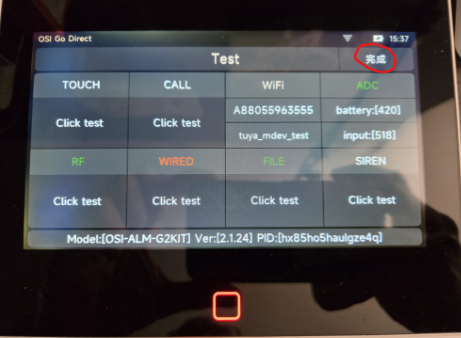
2. Press 'OK , then enter 0728 0728, then select OK', the screen will enter the engineering mode.
3. Now check if the 'RF' (bottom right) is Green OR Red.
4. If it is Green, it means the RF code reading function is good; Red means malfunction.
5. If it is Red, you can fast-press (keep tapping) the 'Click Test' under RF multiple times to see if it will turn Green or not.
6. Please let me know the results.
To exit out of the engineer menu, hold your finger down on the 'symbol' or 'OK' I circled (attached image) for about 3 to 5 seconds and the Gen 2 will reboot back to the main screen. Since you have the newest firmware it may appear as 'OK' at the top right of the screen. You can hold that down until the panel reboots.
See Video: RF CHecking VIdeo